
About

Work

Contact

 |  |  |  |
|---|---|---|---|
 |
Dental Claims SaaS Experience Design for Henry Schein One
UX/UI/IA Research, Strategy, Usability Testing and Design
Henry Schein Ones' user demographic was changing rapidly after COVID, and they set out to build a new cloud-based Revenue Cycle Management (RCM) solution that would leverage the growing large multi-location dental claim offices that do centralized billing.
Overview
Role - Led UX/UI design strategy and execution from discovery through delivery.
Design System - Built a scalable design system that became the foundation for a global rollout.
Team - Collaborated with product and engineering to align and plan phased development.
Research - Ran multiple rounds of user testing to gather feedback and refine designs.
In Production - Launched the main claims section as the MVP for beta testing, then later expanded the platform based on user insights and evolving needs.
Industry Focus - centralized billing companies that provided critical feedback on usability and user flows.
Processes
Gathering Business Requirements | Stakeholder Interviews | UX Research | Value Proposition | Wireframing | Information Architecture | Brainstorming | Visual Design/Iconography | Branding and Identity | Hi-Fidelity Prototyping and Presenting | Context Strategy | Motion | UX Handoffs | Designed UX Documentation Template | Documenting Functionality for Development | UX Training | User Testing | Compile Data | Pattern Libraries & Design Systems
Methodologies
UX Design Thinking | Lean UX | Agile/Iterative | A/B Testing | Beta Testing | SUS Analysis | User Interviews | Online Surveys | Usability Testing | Voice of Customer | Accessibility Evaluation | User Journey/Journey Mapping | Task Analysis | Content Audit | Heuristic Analysis
Design Systems
Material Design | Fluent | IBM Carbon | Apple
Sample of Large MVP Project
Testing
Timeline - 4 months to MVP (date promised before UX)
Project kick-off Research & Discovery
Problems and Challenges
Design, Demo and Ideation
Usability Testing, Stakeholder Reviews, Content Analysis
Implement Feedback, Final Demo
Document and Present to Development
Kick-off Objectives
-
Gain an understanding of the existing in office experience, their processes, and the way patients are billed by single site billing.
-
Learn how centralized billing processes differ from single-site billing.
-
Identify opportunity areas and propose a future state experience for the centralized billing user journey with actionable product and service concepts that our client can implement in the near future.
Objective
Design a cloud-based Revenue Cycle Management (RCM) solution that would leverage large multi-location dental claims offices doing centralized billing so they can continue to be a leader in the vastly changing Dental Clinic market.
Planning
Research & Discovery
Our Approach to research goals
-
A discovery phase...
-
Understand market needs and changes
-
Competitive Analysis
-
Map out process for claims
-
-
Set up a workshop ...
-
Maximize our limited access with stakeholders and centralized billing offices
-
Gain a deeper understanding of processes and experiences
-
-
Post-workshop synthesis...
-
Map the data about the ecosystems and experiences.
-
-
Internal product assessment for existing dev efforts...
-
Assess existing products
-
Create a user-centric workflow where all runs seamlessly with a user-friendly UI, in turn generating more money due to the ease of use and easy to understand product offerings.
-
-
Craft a New Product Story with...
-
Opportunity areas
-
a future state journey map
-
Discovery Phase
Stakeholder Interviews
The results of these interviews informed our strategy for "bring to market", the current state of the industry, and any competition.
Results
The Role of Billing Specialist
Found out the relationship between the clinics and the billing specialist.
Unpacking The Current Experience
Many Baby Boomer-era dentists retired during COVID, leading to a surge in demand for modernized technology. As a result, stakeholders and their teams were struggling with outdated billing systems that made processing claims inefficient. Hearing their pain points and goals was key to shaping our problem statements and overall strategy
Shaping the Future Billing Experience
After exploring the market, it became clear that the only way to build this product was by aligning with the stakeholder team's vision for the future billing experience. Third-party administrators were starting to take over the space.
Competitive Analysis
Current market for centralized billing
Basically that there were not products out there to compete with and companies were using existing PMS Billing systems in a unorthodox way.
Claims Process

Workshop
Details
Focus
Get as many billing agents in a session at a time.
Purpose
Help experience designer's understand needs, challenges and create wish lists within the dental billing world. Brainstorm and Journey map.
Significance
Guide the billing specialists to strengthen and differentiate the centralized experience in a way that builds relevance for the product we are building.
Part 1: Current State Mapping
To explore the ways in which specialists perceive their actions, thoughts, and feelings regarding their patient onboarding experience and a billing/claims journey.
Activities
-
Post Up generation (15 Min Generation and 30 Review and Map patterns)
-
Requirements and Constraints review (small group)
-
Task analysis and Journey Mapping (large group)

Part 2: Future State Ideation
Imagine how and in what specialists perceive and desire to interact with the patients and the platform in the future.
Activities
-
Archetype Empathy Mapping - Patient vs Specialist (small group)
-
Concept Mapping - whiteboard or sketches (small group)
-
Concept Prioritization & Presentation - Ranking activity (large group)
Synthesis
Supporting Archetypes & Ecosystem
Research revealed key insights into patient and specialist journeys, helping to highlight gaps between current solutions and the ideal future for centralized billing.
Front End Office Specialist
Enters New Patient insurance into system and sets up appt with estimated type of service.
Manager
Assigns work, tracks specialist workload
and accounts, could handle work also could pull reports.
Supervisor
Assigns work, runs reports,
Track workloads and what's being completed.
Billing Specialist
Assigned to workload, pod and/or
payer, work is assigned to them and they may or may not
be able to pass claims or eras to other specialists.
Admin
Controls users and settings for custom settings
Future State Story
Opportunity Areas
The key insights from the group research workshop identified core needs and opportunities for centralized billing, where HS1 can deliver real value to teams and the broader industry.
-
The solution must be PMS-agnostic to support all clients, not just one platform.
-
Teams need the ability to customize their digital workflows to fit their processes
- Centralized billing structures vary:
-
Could be a corporation, third-party administrator, or a merged/acquired business.
-
Some require separate claim filing due to different tax IDs.
-
-
There's a strong need to automate the ERA process, especially for bulk submissions.
-
Integration is key:
-
Patient verification should connect front office systems- PMS with RCM tools
-
-
Teams need tools to assign claims to different members, allowing collaboration on different parts of a claim.
Design Phase 1
Example of Use Case for Claims Manager:
Claims Buckets & Grid Filtering
Step 1 - Mockups of grids created for research purposes


Step 2 - Perform user research utilizing a combination of methodologies all-in-one survey within MS Forms
The following more research was done to gather insight into:
-
how the user would need to quick links to batches of claims that would automatically be pulled in to buckets.
-
how a user would want to customize the claims in the grids by filtering the columns based on their personal process.

Step 3 - Analyze Data from Research
The findings showed:
-
Change Open Claims to Unresolved claims
-
Redesign filters
-
Revisit how assigned to functions
-
Relocate the Assigned to column
-
Reorder columns and add History column with quick view to history to Sent Claims tab
-
Research more into validation errors and Pre-D/COB workflow
-
Need to have a bucket or additional tab for finished claims that need to be quality checked and reviewed.
-
Many users wanted to add notes quickly from the grid.
-
Add a Save Filter option (Second Survey was sent out)

Step 4 - Feature Epic created with User Stories:
-
As a user I need to filter the grids based on my role. Within my role I may filter based on workflows, duties, or by clients/payers I work with.
-
As a user I need to save any custom filters to a list so I can use them later.
-
As a user I need to see the history of a claim quickly.
Step 5 - Meet with development team discuss findings and ideas.
-
Presented accurate workflows


-
Presented components like Kendo React in line filtering that we could use that would satisfy the user needs and take up less space on page.

-
Brainstormed next phase.
-
Discussed edits and how new features could be easily added
-
Added user stories to backlog and determined levels of priority.


Step 6 - Iterate mockups based on user feedback from survey and dev meeting.
-
Since I was also building a global design system, the focus stayed on core page functionality—search and location settings were handled on the back end and planned for future integration.
-
I documented UX handoff notes throughout the design process.


Step 7 - Create prototype to validate designs
We had 10 responses from previous participants that validated the prototype.
Step 8 - Document all final functionality for development.
How will the users need to filter the claims and grids?
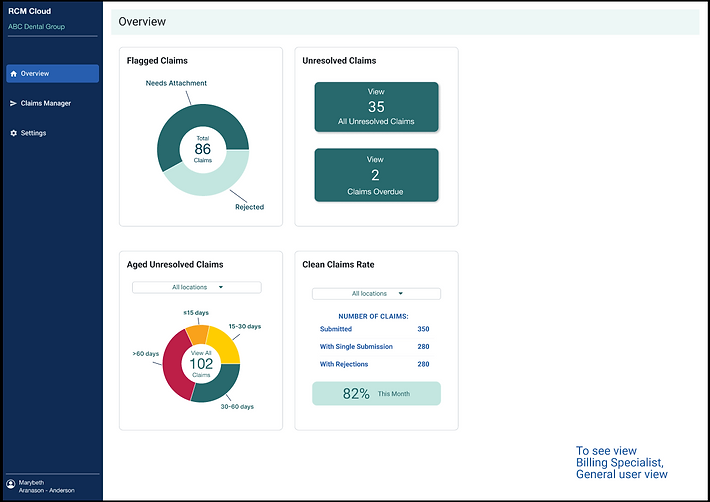
Wireframes & Mockups for Dashboard Iterations

Designing a Dashboard
Designing a dashboard that displays different information based on the user.
Claims Specialist
Display needs information based on the claims they are processing.
Manager
Display needs to show information about the claims that have been processed by the Claims specialists and ability to see revenue from claims processed between specified dates.
Iteration 1
Dashboards created for stakeholders to give feedback on what they would want to see when running reports or needing to view data.
Edit Claims Manager

Add ERA Manager

Iteration 2
New features to be able to view data during certain dates and by locations, dashboard was organized into 3 sections (totals, highlights and statistics reports) , SUS Analysis was added for stakeholders in testing environments, ability to expand payer revenue to see all payers, and added color to features.
Edit Claims Manager and document new updated functionality for developers.


Highlights feature brainstorming and mock ups for talking point in design review meeting.

Mock up for usability testing to find out if majority of users want to see for chart and settings.

Iteration 3:
Updated Feedback button to have motion design. I wanted to add a call to action for button and delight for users.
The thumb motion: bounced 2x, paused, flipped and bounced 2x, paused ...repeated on loop.

The charts were finally able to get a user story for dev work so I finally got to work on the design and I designed them to display a key along side of the chart.

ERA user feedback was implemented. New card was created based on feedback and Payer totals chart was completed.

Global Design System Implementation


Wins
-
Established proper testing environments.
-
Implemented 3 separate design systems for On-Prem (Win UI 3/ Fluent), Cloud based products and customer facing products
-
Provided rapid designs/mockups/prototypes and gathered data for product managers who has minimal UX experience to support important decisions that lead the design and UX for the products.
-
Was able to work with many teams cross-functionally to research and mentored an intern and supported junior level designers.
-
Led the creation of a global design system to integrate all products in to one platform offering instead of micro-services.
Challenges